MCP Server
JEB's Model Context Protocol (MCP) server offers tools for AI agents to instruct JEB to perform reverse engineering jobs.
A frontier LLM with strong reasoning and good tool use can bootstrap or speed up the analysis in unexpected ways!
We strongly encourage you to try it out, through VIBRE or the harness you are most comfortable with (Claude Code, Codex CLI, OpenCode, etc.) Start with a basic prompt (example: "Provide an analysis of the opened file") and see where you will end up.
The MCP server can be started in three different ways:
- In the GUI client: manually via the File menu, or automatically when using the VIBRE assistant.
- On the command line: with
-c --mcp. Example on Windows:jeb_wincon.bat -c --mcp. Use-c --helpto see all available options. - Programmatically: via the
JebMcpServerInstancefactory object. Refer to the API doc for options.
VIBRE#
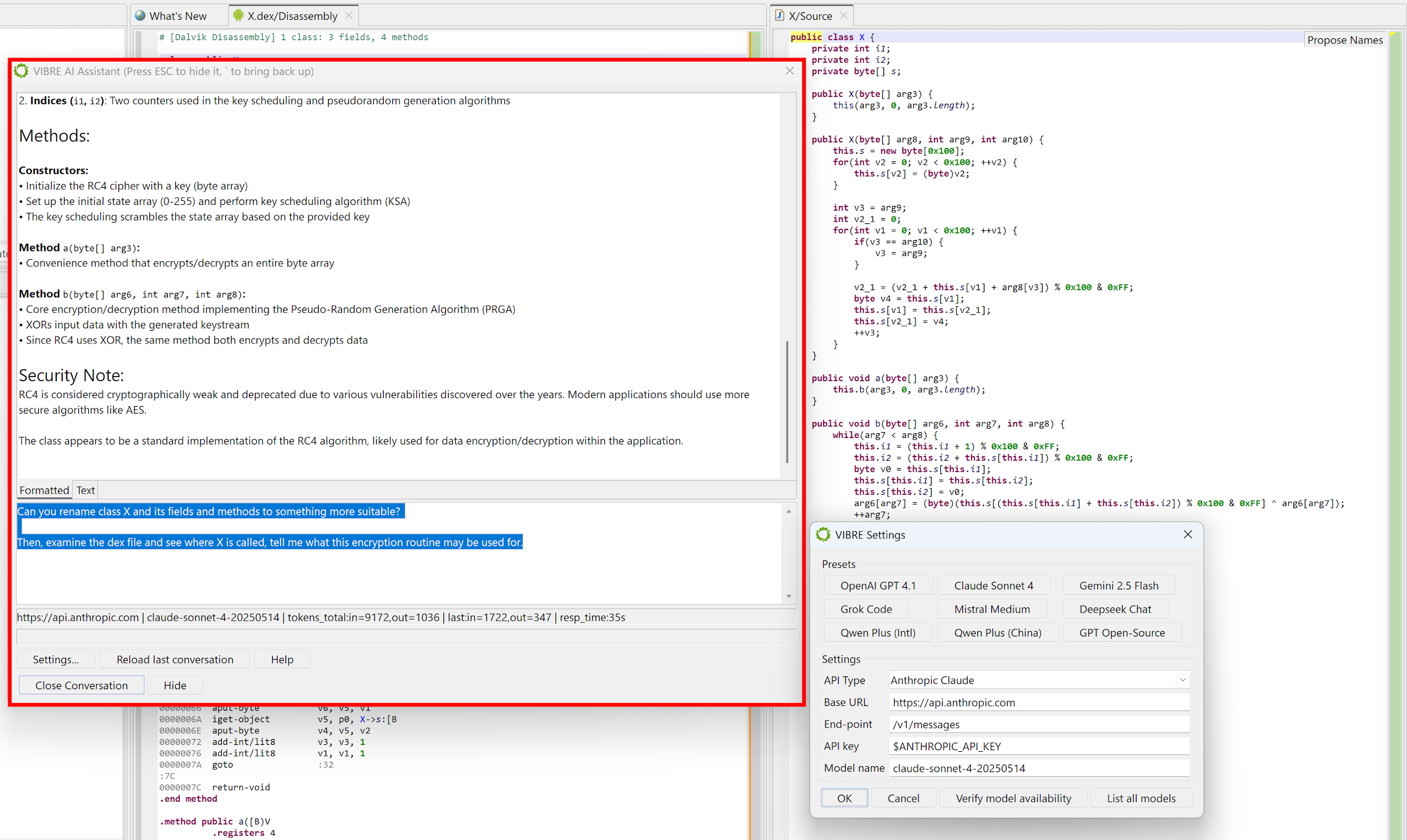
VIBRE is an AI Assistant available in the JEB GUI client. It is a conversational agent that uses JEB's internal MCP server to help the user reverse-engineer and understand the project files. It may be called at anytime and from anywhere by pressing the backtick (`) key.
We provide LLM connectors for the following protocols and compatible:
- OpenAI Chat Completions (
/chat/completions) - OpenAI Responses (
/responses) - Anthropic Messages (
/messages) - Google Gemini (
/$MODEL:generateContent) - AWS Bedrock (
/model/$MODEL/converse)
You may use the LLM of your choice, such as ours (free, limited throughput), a commercial LLM (OpenAI, Claude, Gemini, Deepseek, Mistral, Grok, etc.), a private/in-organization LLM, or even a smaller local model running on your computer.
Common Agents#
You may use JEB MCP through the agent of your choice. Below, we provide examples for the most common agents, assuming JEB MCP is started on localhost, port 8425 (the defauls).
Codex CLI#
To register JEB MCP, execute this command in your terminal:
codex mcp add jeb --url http://localhost:8425/mcp
Claude CLI#
To register JEB MCP, execute this command in your terminal:
claude mcp add --transport http jeb http://localhost:8425/mcp
OpenCode#
To register JEB MCP, execute this command in your terminal:
opencode mcp add jeb --url http://localhost:8425/mcp
LM Studio#
Add an entry to your mcp.json file, under the "mcpServers" key:
{
  ...
  "mcpServers": {
    "jeb-mcp-server": {
      "command": "npx",
      "args": [ "-y", "mcp-remote", "http://localhost:8425/mcp" ]
    }
    ...
Claude Desktop#
Open File, Settings, Developer, Edit config... and add an entry to your claude_desktop_config file, under the "mcpServers" key:
{
  ...
  "mcpServers": {
    "jeb-mcp-server": {
      "command": "npx",
      "args": [ "-y", "mcp-remote", "http://localhost:8425/mcp" ]
    }
    ...
MCP Tools#
Tools range from basic project information retrieval to project annotation, unit retrieval, decompilation, all the way to JEB script writing and execution and running complex task. Example
- get_client_information
- open_project
- ...
- get_project_information
- list_units
- ...
- decompile_code_item
- get_disassembly_snippet
- list_decompiler_events
- rename_code_items
- rename_pseudo_code_variables
- ...
- run_apk_unpacker
- run_apk_analysis
- run_script
- get_ui_fragment_information
- ...
See the complete list of JEB MCP tools as of JEB 5.46+.